Your record is ready.
What's the release plan?
A small, self-guided sample of the release-planning approach.
Baby Blue gives your AI assistant a release-planning workflow. Paste in the setup file, answer questions about your record, and build the plan around your music.
One-time purchase · instant downloads · 30-day refund policy
Use with your own AI account. Any AI subscription is separate.

Get the release out of your head.
Put it on the calendar.
The mix is done. Now there's an announce date to choose, a story to tell, and a list of people you keep meaning to find. Baby Blue walks you through that work, using the record you're releasing.
Your dated plan
Work backward from release day. Put the announcement, outreach, follow-ups and release-week tasks in order.
Your press draft
Answer questions about the song, the sound and the story. Review a press-release draft built from your answers, then edit it until it sounds like you.
Your contact map
Research people who fit your music and draft a personal hello for each. Unverified details stay marked for checking. A short, honest list beats invented contacts.
Your next session
Save the record notes, contacts and activity log. Bring those files back to your assistant so you can continue where you stopped.
These are the tasks built into the supplied setup file. You bring the record and review the work; your assistant's capabilities and the available research affect what you finish.
Download. Paste. Talk about the record.
After payment, download your files and make a folder for this release. Open the Baby Blue setup file, copy its contents into your AI assistant, and follow the questions.
You don't need to learn a prompt-writing method first. The file supplies the interview, the drafting steps and the rules for keeping track of the work. With file access, your assistant can save the documents. In a chat-only app, you save them yourself using the included instructions.
Start with one sitting. If the research takes longer, or the record isn't finished, save what you have. The plan carries the unfinished work into your next session.
The first question protects the music.
Before the interview, Baby Blue asks what must stay yours: the vocals, the lyrics, the artwork, the performance. Your answer becomes a standing rule for the assistant.
It drafts the release materials for you to review. You decide what leaves the folder. Send messages and publish posts from your own accounts when you're ready.
Built while putting our own record out.
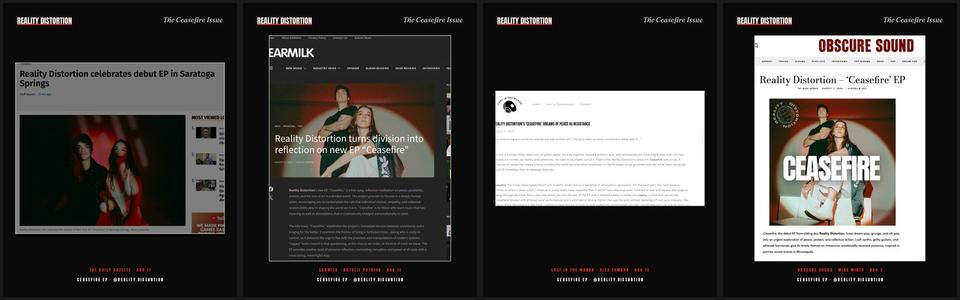
Devon and Linnea Seegers make music as Reality Distortion. The broader Blue system helped organize the work around our debut: press materials, contact research, follow-ups and the release calendar.
Baby Blue is the starter drawn from that workflow. The clippings below are from our band's campaign. They show the work behind the product, not results promised to a buyer.
Start with your next release.
Buy Baby Blue once. Use it for your own act's releases, with the AI assistant you choose.
Want the detailed playbook too?
Add the Release Cycle Kit at checkout for $19 more. It includes the backward timeline, press-pitch timing, outreach checks, follow-up routine and show-week runbook.
Baby Blue works without the kit. The checkbox starts off; choose it if you want the extra reference material.
Baby Blue: $29. With the kit: $48.
Before you buy.
What am I actually buying?
A downloadable setup file for your AI assistant, plus a dashboard and checklist. The setup guides your assistant through the release work. This $29 product doesn't include a human publicist, done-for-you outreach, or the full Blue label system.
Which AI assistant do I need?
The file was written for Claude. It contains plain-text instructions and a chat-only fallback for other capable assistants. You'll need your own account; its fees and terms are separate. Web browsing helps with contact research, and file access helps with saving the work.
What if my assistant can't search the web?
The setup tells it to ask you to check sources and bring back the details. It should mark unverified contacts clearly. Always check names, addresses, dates and claims before you send anything.
Will it finish everything in one sitting?
That depends on your record, the research and your assistant. The workflow starts with the dated plan, then the press draft and contact map. If you stop early, save your notes and pick up the unfinished tasks next time.
Does it send emails or publish music?
No. The product instructs your assistant to draft only. You review, approve and send from your own accounts. You keep your masters and publishing; Baby Blue takes no commission.
How do I get my files?
Stripe sends you to your download page after payment. Download the files and bookmark that page. If you lose the link, email devonseegers@gmail.com with your receipt.
What if it isn't useful to me?
Email devonseegers@gmail.com within 30 days of purchase for a refund. Keep your press draft, your plan and the other work you created.
Give the record a next step.
Review your order, choose whether you want the kit, then pay through Stripe. Your downloads are waiting on the next page.
Want to see the release timeline first? Download the free checklist. No email needed.